SHSHがない!というiPhone iOS4.0.2ユーザーに朗報 4.0.1へダウングレードでJailbreakMe
BigBossで、CodeBlue氏がiPhoneのiOS4.0.2をSHSHなしでJailbreak可能な4.0.1へダウングレードする方法を発見したことを伝えていました。本日ツイッターでiPhoneユーザーさんからJailbreakで情報を多数頂いたお礼に(リクエストも頂きましたので)、GamaGazブログでは普段扱わないiPhoneネタですが翻訳してみます。
【情報源:BigBoss】
4.0.2 to 4.0.1 Downgrade Possibility
4.0.2から4.0.1へダウングレードが可能にA user named CodeBlue has discovered an unconfirmed method that may allow you to downgrade your 4.0.2 iPhone to 4.0.1, jailbreak, patch the safari exploit with Saurik’s patch and be jailbroken safely. This may be your only option if you have an out of the box iPhone with 4.0.2 on it and no other way to jailbreak. Note that I did not try these steps. They sound good to me in theory and others are reporting some success. After all, you have nothing to lose if you are already stuck on 4.0.2 without an SHSH in Cydia. Here are the steps:
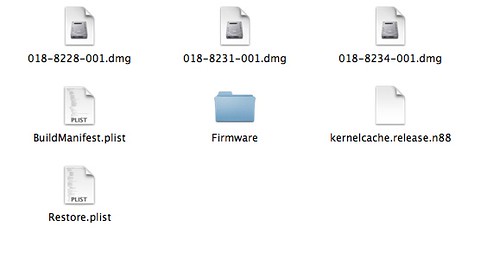
あるiPhoneユーザーのCodeBlue氏が未確認ながら4.0.2のiPhoneを4.0.1へダウングレードする方法を発見しました。Jailbreakが可能になり、Saurik氏のPDF patchでSafariの脆弱性にもパッチも可能で安全なJailbreakが実現できます。この方法はiPhoneが4.0.2の場合のみ適用可能でJailbreakする方法がないとお嘆きの皆さん向けです。なお、私自身この方法を試していません。ただ理論的には大丈夫そうで、成功事例もあると聞いています。あなたのiPhoneが4.0.2でCydiaでSHSHも保存していないためになす術無しだった方に取っては試して損はないでしょう。やり方は以下です。1. Download 4.0.1 ipsw
4.0.1 ipswをダウンロードします。
2. Extract it with winrar or winzip to a folder on the desktop. You may need to rename the firmware file from .ipsw to .zip to do this.
4.0.1 ipswをwinrarかwinzipで解凍します。ダウンロードしたiPhoneファームウェアの拡張子を.ipswから.zipに変更してください。
3. Open the buildmanifest.plist with the notepad. Search and replace all ? 8A306 with 8A400. Save. Repeat the same with the file restore.plist
buildmanifest.plistをNotepadで開きます。メニューから置換を選択し、ファイル内の8A306をすべて8A400に置き換えて保存してください。restore.plistについても同じ操作をします。
4. Download 4.0.2 ipsw and open this with winrar or winzip. Note: do not exact it. Just open it and leave it open. You must use this exact file and not create a new one. If you have to create a new one for reasons like you are on OSX, then use zip command line not explorer or finder to make the zip. I will assume you are using the original file opened in winrar for the rest of this guide.
4.0.2 ipswもダウンロードしてwinrarかwinzipで開きます。注意:解凍してはいけません。単に開くだけです。開いたらそのままにしておきます。アーカイブの中のファイルは使いますが、新たに保存をしないでください。MaxOSの場合標準のアーカイバで解凍すると新たにフォルダを作ってしまうので、そういった場合にはFinder上では行わずzipコマンドラインを使用してください。この後の操作はwinrarでファイルを開いた状態と言う前提で説明します。
5. Take all the files from the 4.0.1 and drag them over to the 4.0.2 zip archive that you have open.
4.0.1の全てのファイルを先ほど開いた状態にした4.0.2のzipアーカイブにドラッグします。
6. Delete all the dmg files that have 002 at the end, leaving only the 001 files left.
ファイル名の最後に002とあるdmgファイル(XXX-XXXX-002.dmgなど)を全て削除し、001ファイル(XXX-XXXX-001.dmg)だけの状態にします。
7. Save the archive. And rename it back to .ipsw if you changed the name to get winrar/winzip to open it.
そのままアーカイブを保存します。zipの拡張子はwinrar/winzipで開くために変更しましたので、保存したら拡張子を.ipswに戻します。
8. Optional: (this helps ensure you get an shsh file request for the future, but should not be necessary to just restore 4.0.1). Add the 74.208.10.249 gs.apple.com line to the host file. If you need help with this step, read this.
オプション:(将来のためにSHSHファイルを取得するのに役立ちます) host file(Windowsの場合はC:\Windows\System32\drivers\etc\hosts、MacOSXの場合は/etc/hostsにある<-注;どれか分からなかった)の最後の行に 74.208.10.249 gs.apple.comを加えます。このステップについて分からないことがあればこちらをご覧下さい。
9. Put the device into dfu, open iTunes and restore the firmware you changed.
iPhoneをDFUモード(APPLE VOICEさんの記事が参考になりました)にしてiTunesを起動し、先ほど変更を加えたipswファイル(MacOSXの場合Optionキーを押しながら復元を押すとipsw選択画面が出るので変更を加えた4.0.2 ipswを選択する)で復元してください。
Check out the original post or give thanks to CodeBlue at his blog.
興味がある方はCodeBlue氏のブログ記事をお読みになり、感謝コメントを残してあげてください。
Note: this only works due to the similarities in 4.0.2 to 4.0.1 and 4.0. This will not be a way to downgrade to 3.1.x and may not work in future firmware updates.
注意:この方法は4.0.2が4.0.1や4.0との構成が類似であるために実現できたものです。同じ方法で3.1.Xにダウングレードはできませんし、今後のファームウェアアップデートでは対策されてできなくなるでしょう。
今日初めてiPhoneを手にして初めてjailbreakなるものをしたばかりなので細かいところを把握しながら翻訳できていません。ご了承ください。
iPhone devチームは4.1.XでJailbreakをリリースしそうなので今回の方法の賞味期限は短いと思いますが、これですべてのiPhoneがJailbreak可能になったといえます。4.0.2で悔しい思いをしているiPhone 4ユーザーには特に朗報でしょう。ただし、私自身も当然ながら試していませんのでこの方法で上手く行ったよ、という方がいればコメント欄にて報告してくださいね。
[追記]
BigBossのコメント欄に書き込みが増えてきましたので読んでみると、iPhone 3GSでは動作したがiPhone 4では動作しなかったという報告があるようです。

touch 3G 8GB
成功しました。
@kyuxtupaさん
おお!ありがとうございます!
Touchでも使えたのですね。3Gと3GSなら使えるのかな?
私もtouch 32G(SHSH保存なし)にて4.0へのダウングレードに成功しました。
ありがとうございました!
iphone3G(8GB)を3.1.3から4.0.2にして
和訳されている手順で4.0.1にダウングレード
成功しました!!
検証結果を私のブログでも紹介させていただいて
よろしいでしょうか?
忙しいので夜になるとおもいますが…
@atsunaoさん @Mookさん
報告ありがとうございます。
ブログでの紹介OKですよ。
私のiPhone4(出荷時から4.0.2)は途中でエラーとなり進みませんでした。
@ほたさん
うーん、初期が4.0.2はまずダメでしょうね。あるいはやはりiPhone4自体が受け付けないのか…貴重な情報ありがとうございます。
touch 3Gで成功された方にお聞きします。ipswファイルはipod 3Gのもの
(8A400と8A293)を使用されたのでしょうか?それとも上記通りのiphoneの
8A400と8A306を使用されたのでしょうか?OS 3.12を4.0.2にバージョンを上げ、上記通りにしてもダウングレード出来ません。良きアドバイスをよろしくお願いします。
@momo
僕のtouch 3G 8GBはMCモデルのため、
touch 2Gの4.0と4.0.2を利用しました。
momoさんのtouch3Gが8GBならtouch 2G用を、
16GB or 32GBならばtouch 3G用を利用して下さい。
アドヴァイスですが、
touchの場合、4.0.1がないので4.0を用意して下さい。
それで8A306ではなく8A293を8A400に置換してください。
僕の場合002とあるdmgファイルがなかったのでdmgファイルは全く全く触ってません。
3G32G
iPhone2,1_4.0.2_8A400
認証エラーで失敗しました。
CydiaでECID SHSHを保存された方のみ成功するのでしょうか
@kyuxtup
私はtouch3G 64GBを使用しています。8A293を8A400に置換しましたが、やはり出来ません。dmgファイルは8A293と8A400の分を触らず共存させたままです。DFUモードにしituneにつなぎ、復元、”アップルに確認・・・”の表示でやはり弾かれてしまっているのでしょうか?ituneのバージョンは9.2.1.5です。
はじめまして。記事読ませていただきました。
iphone4のos4.0.2です。
どうしてもダウングレードがしたく、手順通りにやってみたのですが、4.0.1のファイルを4.0.2のzip内にすべてドラッグできません。
「Firmwareフォルダが既に存在しています」的なポップアップが表示されます。やり方を間違えているんでしょうか?
また、同名ファイルがあると思いますが、
ファイルはすべて上書きでいいのでしょうか?
iphone 3GSにて成功いたしました。とても感謝しております。これで、b-moble simにアクセラレータ設定をして快適に使用することが出来そうです。ありがとうございました。
@みなさま
報告ありがとうございます。
@Tedさん
CydiaでSHSH保存していないとできないという話ではないはずです。
@sa-saさん
それは4.0.2 ipswを解凍してしまって作業していませんか?
@momo
同じ名前のdmgファイルは上書きしてください。
また、更新の方でやるのではなく、dfuモードにして、復元でやってみてください。
@momo
私も作ってみるのでお待ちください。
@kyuxtupa
ありがとうございます。報告をお待ちしております。
(dufモードにして、復元で試してみましたがダメでした)
iphone3gs 32gb
成功しました。
↑iphone3g新ブートです
iPhone 4 16G 初期4.0.2
無理でした。
3度目にて成功しました!
3G32G
1.hostsを書き変えなかった為失敗
2.hostsを書き変え再挑戦。
apple認証を通ったがエラーで失敗。
3.再起動後、再挑戦し今度は成功。
情報どうもありがとうございました。
@All
皆さん報告ありがとうございます。
iPhone4は無理ということが分かりました。
3GSで優越感に浸れましたw
何度やっても、4.0.2から変わりません。DFUモードにはなっているんですが、バージョンを下げることが出来ません。
皆様ご存知かと思いますが、Iphone4ではこの技は使えません。「Iphone4の4.02⇒4.01ダウングレード!」という英語版のサイトは皆一生懸命、「Iphone4の4.02はダウングレードできません」と書き換えてます。
毎日一生懸命4.02にアップグレードしてしまったUSモデルを片手にUnlockサイトを探してますが、絶対みつかりませんね。あと、お金を払えばUnlockソフトダウンロードというのは皆嘘ばかり(普通にJailbreakのホームページを教えてるだけ…)なのでご注意を!
9月9日時点では世界中どこを探してもIphone4 4.02の解除方法はありません。
Iphone4でも4.01以下のものは普通にIphoneのサファリを使ってJailbreak.comを開いてCydiaをゲットして通常通りのやり方で解除可能だそうです。
iOS 4.1が公開され、近くJailbreakもできるようになるようです。この技の賞味期限切れたかな?というところです。
windows7の場合、shiftボタンを押しながら復元ボタンをクリックしないと、自動的にiOS4.1にアップグレードされ、工場出荷時の状態に戻ってしまいました。
This is a great blog you have here. I have one as well, let me know if you would be interested in exchanging links. Here is mine http://iphoneblogr.com
@iphone jailbreak
ありがとです。でも、実際にはiPhone関係のブログじゃないんですよね〜
はじめまして\(^O^)/
(3194)エラーが出てしまいます(゜∀゜)
何故でしょうか?(・∀・)
3gs新ブート ios4.0.2
itunes9.2.0.6.1
しゃげさんと一緒で旧ブートROMですがなってしまいます
作ったファイル失敗なんですかね?
同じく3194エラーでできませんでした・・・
USB繋げっていう画面から回復しないので、仕方なく普通に復元
『C:\Windows\System32\drivers\etc\hosts)の最後の行に 74.208.10.249 gs.apple.comを加えます』
海外サイトを見ていたら、3194エラーの対処法では本文中に書いた上記の部分以下の話がでてくるのが多かったです。
私はiPhoneに関しては素人もいいとこなので的確なアドバイスできません。もし分かる方がいたらお答え頂けると助かります。